What is a Design System and What is it For? Definition and Comprehensive Guide

7 minutes
.
June 30, 2026
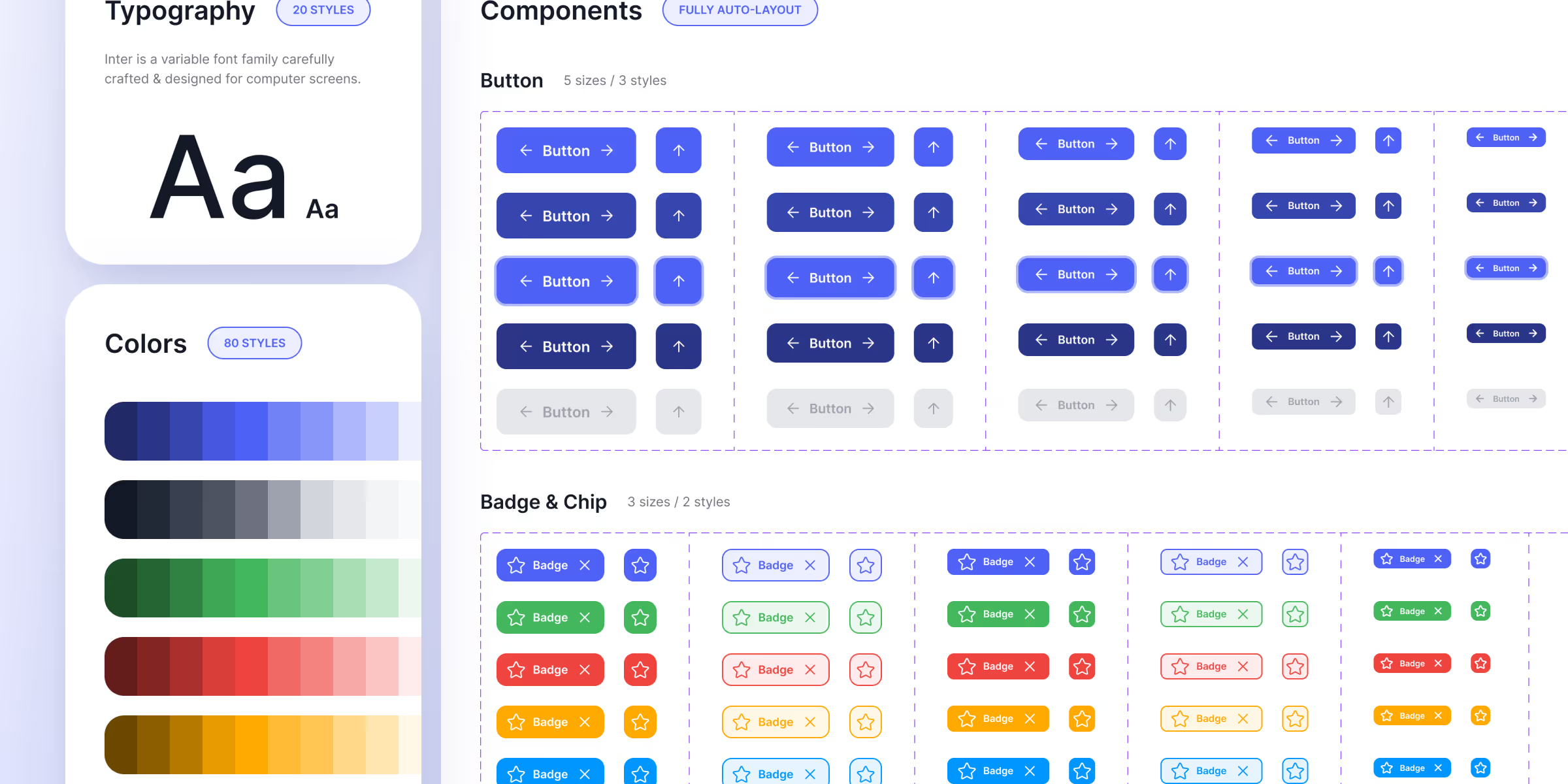
A design system is a centralized repository that brings together all the rules, components, and visual standards of a digital product. Colors, typography, spacing, buttons, forms—everything is defined once and reused everywhere. Its role is simple: to ensure complete visual and functional consistency across a website or application, while also speeding up the work of design and development teams.
But behind this definition lies a reality that few articles truly explain: a design system isn't just for designers. When well-built, it's a business lever that determines integration quality, client autonomy, and a site's ability to evolve over time. This is precisely how we leverage it at Noqode, as a premium web design agency, and that's what we'll detail here.
A design system addresses three recurring problems in website and interface creation.
The first is consistency. On a website with dozens of pages, without a common framework, each page tends to diverge: approximate spacing, accumulating color nuances, slightly different buttons. The design system imposes a unique visual language that holds across the entire site.
The second is efficiency. By defining reusable components once and for all, you avoid redrawing the same elements repeatedly. Time-to-market is reduced, and updates automatically propagate to all affected screens.
The third, often overlooked, is collaboration. A design system creates a common reference point between designers and developers. Everyone speaks the same language, which drastically reduces back-and-forth and misunderstandings during implementation.
A complete design system is built around several building blocks, from the most atomic to the most complex.
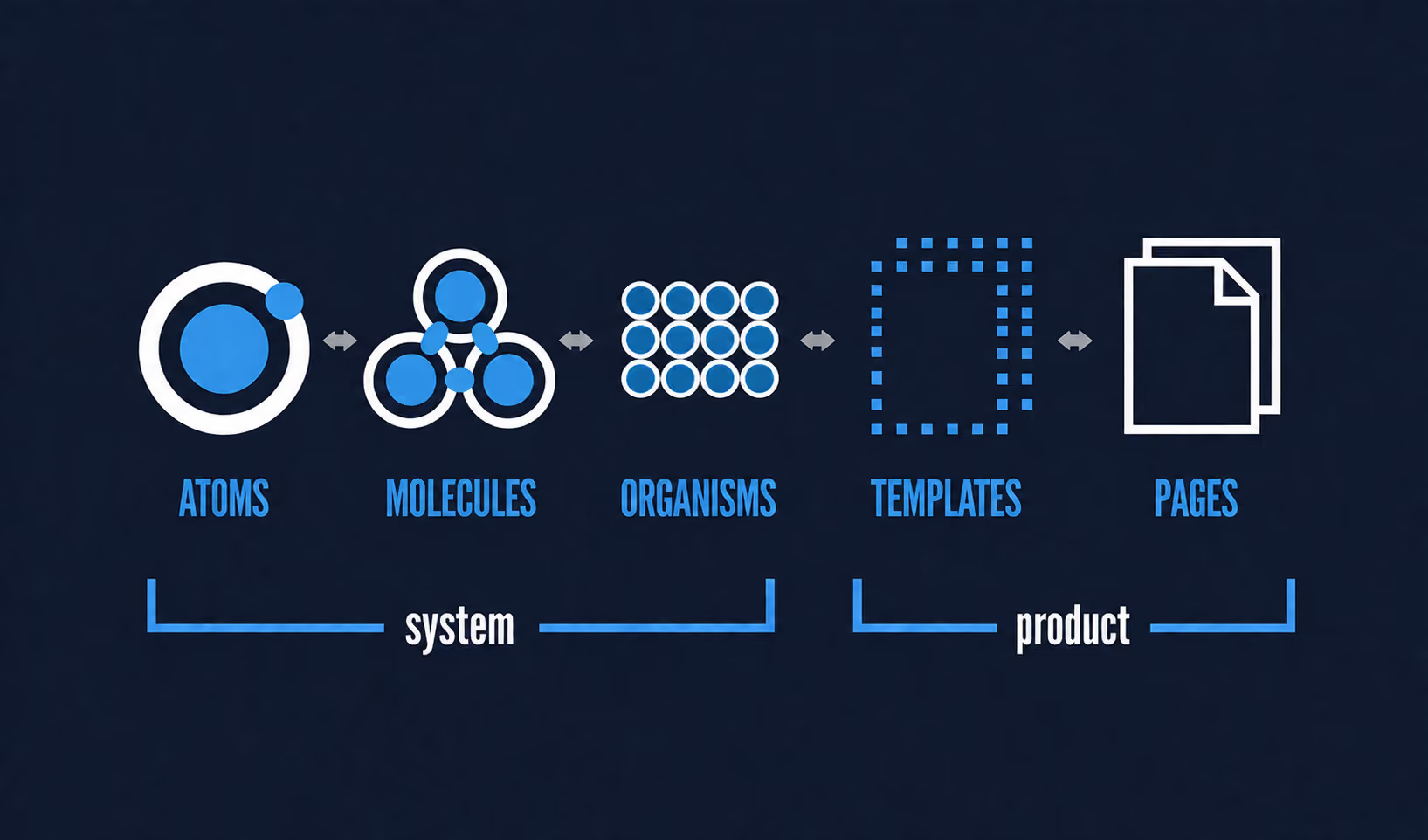
Building a design system most often relies on a proven methodology, atomic design, conceptualized by Brad Frost. It breaks down an interface into five successive levels.
This modular logic ensures isolated, reusable, and easy-to-maintain components. A golden rule guides this approach: always define tokens before components, and components before templates. A modified component then automatically updates all screens that use it.
This is where theory meets practice. A generic design system remains an abstract object. Its true value lies in how it is conceived, structured, and utilized. Here's how we build it.
Most design systems are designed by designers, for designers. Ours is designed from the outset for development. Specifically, our Figma variables follow a precise, integration-oriented nomenclature, such as size-small, size-medium, with distinct sets of variables for desktop and mobile.
This rigor isn't just cosmetic. It then allows for a seamless transposition to Webflow, where these variables adapt by ratio to produce a fluid responsive clean design, rather than a simple degraded mobile version of the desktop. It's a client-first approach that we apply as a specialized Webflow agency, where every design decision already anticipates its translation into code.
.png)
Because the design system is built for development, everything we validate in design with the client, where we iterate together, is reproduced identically on Webflow. No loss between the mock-up and the delivered site.
And because the integration is based on a clean framework, it natively incorporates what truly matters: optimized web performance, a meticulous technical SEO and a structure designed for AEO, the ability to be cited by AI engines. A design system is more than just about aesthetics; it dictates the technical quality of the final outcome.
For high-volume websites like those of Framboise Consulting or VCola, the design system ensures a perfect visual consistency across all pages. But its benefits go far beyond the initial launch.
By creating reusable components, we empower the client to independently populate their static pages, and even build new pages, such as landing pages, directly in Webflow using these blocks. The site becomes a living system, not a fixed deliverable.
Odoné case study perfectly illustrates this long-term value. After the launch of their SEO and GEO strategy, we created new pages to support this expansion, transforming the site from a single landing page into a much more comprehensive website. The design system established upfront made this extension seamless, fast, and perfectly aligned with the existing structure. Without it, each new page would have been a project starting from scratch. This is the true profitability of a design system: it transforms a website into an evolving asset.
A well-structured design system takes on an additional dimension today, becoming a building block usable by artificial intelligence.
At Noqode, we encapsulate the client's design system in a reference file, a Skill brand-client.md, which Claude consults with each generation. As a result, when we iterate on initial page or section sketches, the AI faithfully adheres to the artistic direction defined upstream, including tokens, usage rules, and components. We detail this workflow in our article on Claude and Skills for designing a homepage.
Furthermore, tools like Claude Design can retrieve the entire Figma design system to produce not only web content, but also print materials or presentations consistent with the brand.
An honest clarification is necessary. AI does not replace a UI designer. Here, Anthony's work remains central; we systematically review and refine the generated outputs. AI serves as an entry point and an iteration accelerator; it compresses the blank page phase, but it does not produce the final deliverable. It's this combination—a rigorous design system plus well-managed AI—that saves considerable time without sacrificing quality.
These terms are often confused. Here's what concretely distinguishes them.
| Element | Scope & role |
|---|---|
| Brand guidelines | Scope: brand identity Contains: logo, colors, typography, visual rules Use: define the brand's appearance |
| UI kit | Scope: visual library Contains: ready-to-use graphic components Use: speed up interface design |
| Design system | Scope: complete system Contains: tokens, components, usage rules, documentation Use: ensure consistency, efficiency and scalability |
In summary, brand guidelines define the brand identity, the UI kit provides a visual library, and the design system encompasses everything by adding the logic, rules, and documentation that make it truly operational. To delve deeper into the boundary between visual design and experience, our article on the differences between UX and UI design further clarifies the topic.
Creating a design system follows a step-by-step approach.
The reference tool for the design phase remains Figma, thanks to its advanced management of variables, components, and real-time collaborative work.
Brand guidelines define a brand's visual identity, including logo, colors, and typography. A design system goes further; it incorporates this identity but adds reusable components, usage rules, and technical documentation. The guidelines describe the appearance; the design system makes this appearance operational and reusable.
Yes, even a small website with just a few pages benefits from it, especially if it's expected to evolve. It ensures consistency from the start and makes adding new pages easier later on. For a website intended to grow, it's an investment that quickly pays off by avoiding the need to redesign everything with each expansion.
That depends on the scope of the project. For a premium showcase website, the design system is built in parallel with the design phase, over a few weeks. For a complex product with many states and components, the work is longer and ongoing, as a design system is a living system that evolves with the product.
Figma is the go-to tool for designing a design system, thanks to its variables, components, and collaborative features. For web integration, Webflow allows this system to be translated into native variables and components, ensuring a website that is true to the design and performs well.
Indirectly, yes. A well-integrated design system produces clean code, optimized performance, and a consistent structure, three factors that influence the technical SEO and the site's ability to be referenced by AI engines. A website's consistency and speed are now quality signals for both Google and LLMs.
Yes. A structured design system can be encapsulated in a reference file that an AI like Claude can consult to generate interfaces that adhere to the artistic direction. AI accelerates the exploratory phase, but the work of a UI designer is still necessary to refine and finalize the output.