Oops! Something went wrong while submitting the form.
🍪 Cookie settings
By clicking “Accept all”, you agree to the storing of cookies on your device to enhance site navigation, analyze site usage, and assist in our marketing efforts. See ourPrivacy Policy for more information.
Framer is a no-code prototyping tool for building websites with advanced animations without writing code. Based on our tests across 15+ projects, Framer excels at interactive prototypes (9/10) but remains limited for SEO (6/10) compared with Webflow.
At Noqode, a Webdesign agency specializing in premium SEO/AEO-optimized websites, we tested Framer under real-world conditions to see how it compares with Webflow, our main stack. This analysis draws on our experience with no-code projects for demanding companies, as well as feedback from clients who have used both tools.
Framer is a no-code tool designed to simplify the design of websites and complex user interfaces. Thanks to its intuitive visual editor, Framer lets designers create engaging experiences without writing a single line of code. With its extensive library of reusable components and its advanced customization options, Framer is the ideal tool for designers who want to prototype quickly and streamline their workflows.
Our verdict: Framer is an excellent tool for interactive prototyping and for creating smooth animations, but it does not replace Webflow for projects that need robust SEO, a powerful CMS or complex multi-page sites.
Our Noqode Verdict on Framer: Summary Table
Our detailed verdict on Framer by criterion
Criteria
Details
Ease of use
8.5/10 - Intuitive interface, fast learning curve for Figma designers
Animations & interactions
9.5/10 - Best no-code tool for complex animations and smooth transitions
Design & creativity
9/10 - Total creative freedom, highly customizable components
Technical SEO
6/10 - Limited tags, less flexible URLs and a structure that is harder to optimize than in Webflow
CMS & content management
6.5/10 - Basic CMS, less powerful than Webflow for sites > 50 pages
Web performance
7.5/10 - Varies with animation complexity, manual optimization required
Team collaboration
8/10 - Effective real-time collaboration, but less robust than Figma for static design
Pricing
7/10 - Competitive at $5-15/month, but advanced features are limited compared with Webflow
Support & community
7/10 - Active community but less extensive than Webflow or Figma
Overall Noqode rating: 7.8/10
Framer vs Webflow vs Figma: Detailed 2026 Comparison
Detailed comparison Framer vs Webflow vs Figma 2025
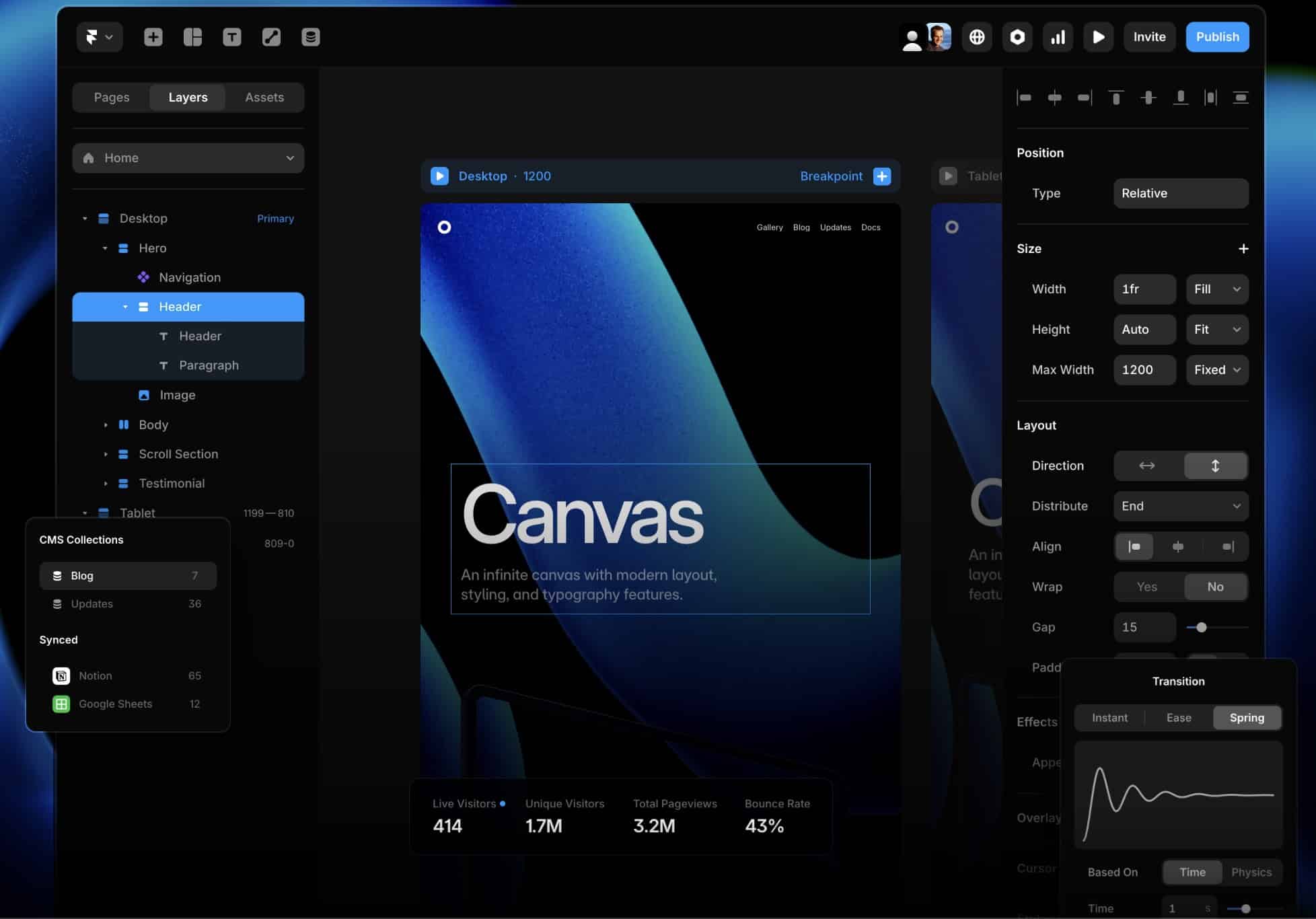
The Framer interface with its Canvas visual editor, integrated CMS collections (Blog, Updates) and real-time analytics (414 live visitors, 1.7M unique visitors)
Framer's interface is designed to be intuitive, allowing users to build complex interactions that are easy to manage with Framer's advanced features in just a few clicks. Thanks to its visual editor, you can fine-tune every detail without needing a developer.
Framer offers precise control over animations, beyond the native interactions of many other no-code tools. The editor lets you create sequential fade-ins, SVG morphing and multi-layer parallax effects without code.
2. Reusable components for increased productivity
Framer offers a rich library of components and ready-to-use templates, allowing you to save time while customizing your designs to meet the needs of your projects.
Framer's component system (inspired by Figma) lets you build consistent design systems that are easy to maintain. You can define variants (primary/secondary button, small/large card) and apply them across the whole site instantly. Thanks to centralized components, changing the primary color and typography of an entire site takes only minutes.
3. API integration and automation
Framer integrates easily with external APIs and other tools to enrich your prototypes and support task automation, turning your ideas into functional prototypes. However, its ecosystem is less extensive than Webflow's (Zapier, Make, Memberstack, Finsweet) for advanced automations.
4. Real-time collaboration
Work as a team, share your mockups and get instant feedback to improve your projects. Real-time collaboration in Framer speeds up the approval process and reduces the number of iterations.
Like Figma, Framer allows multiple designers and clients to work on a project at the same time. Contextual comments and automatic versioning make quick iterations easier.
5. Responsive design and mobile optimization
All designs created with Framer are responsive by default, ensuring an optimal user experience on every device, whether desktop, tablet or mobile.
Framer handles responsive design through breakpoints in a visual and intuitive way. For designers used to Figma, the “frame-based” approach is immediately understandable, with no technical training required.
Practical uses of Framer
Create interactive prototypes
Simulate animations and smooth transitions to better visualize how your interface behaves before development. Framer excels at creating clickable prototypes with advanced animations that you can share with clients or investors to validate UX concepts.
Landing page design
Design high-performing landing pages for your marketing campaigns in just a few hours. For single-page sites where animation and visual experience matter more than long-term SEO, Framer offers unmatched creative freedom.
UX/UI optimization
Use Framer to improve the user experience by testing interactions and animations before launch. It is ideal for validation phases before final development, or before migrating to Webflow as the project grows.
Team collaboration
Facilitate collaboration between designers and developers for a smoother creative process. Contextual comments and fast iterations shorten approval time.
Key figures
+1 million designers around the world use Framer to create interfaces and websites
Real-time collaboration with contextual comments and automatic versioning
Reusable components allowing instant global changes
Marketplace templates with hundreds of free and premium templates
The benefits of Framer for users
Framer, a no-code website building tool
1. Create complex animations in a few clicks
Framer lets you simulate transitions and smooth animations for your prototypes without any coding skills. The tool is ideal for designers who want to quickly test concepts before presenting them to clients.
Framer offers the best no-code animation editor on the market. You can create smooth transitions, parallax effects, complex hover effects and scroll animations without writing code.
2. Exportable and ready-to-use prototypes
With Framer, you can easily turn your mockups into interactive prototypes and export them for user testing or client presentations. Prototypes can be shared via URL instantly.
3. Collaborative and efficient workflow
Framer simplifies real-time collaboration with your team, enabling faster iterations and instant feedback, which improves both productivity and project quality. The learning curve is especially short for designers used to Figma.
Framer's Limitations: What We Miss (Critical Analysis)
1. Technical SEO: Less Robust than Webflow
Issues identified in our analysis:
Rigid URL structure: slugs and hierarchy are hard to customize
Limited meta tags: less control over title, description and OG tags for each page
Basic structured data: JSON-LD is less flexible than in Webflow
Canonicalization: less granular handling of canonical URLs
301 redirects: less intuitive interface for migrations
Beyond a certain complexity, the Webflow CMS offers much more power and flexibility.
3. Performance Varies with Complexity
Complex animations can hurt performance if they are poorly optimized. Manual optimization becomes necessary on animation-heavy projects to maintain good Core Web Vitals.
4. A Less Extensive Integration Ecosystem
Although Framer offers API integrations, Webflow has a much richer tool ecosystem (Zapier, Make, Memberstack, Finsweet, Jetboost) for advanced automations and custom features.
5. Accessibility (WCAG/RGAA) Is Harder
WCAG standards and RGAA are harder to implement rigorously on Framer. Webflow allows granular control over semantic HTML, which is essential for accessibility.
Framer vs Webflow: Which CMS tool should you choose?
Framer and Webflow are both powerful no-code tools, but each excels in different areas. Framer is ideal for interactive prototypes and complex animations, while Webflow is perfect for building complete websites with advanced SEO features and seamless content management.
Webflow: our choice at Noqode for SEO-dependent sites and scalable projects
At Noqode, we chose Webflow for its flexibility, its scalability and its ability to deliver high-performing websites that maximize our clients' return on investment.
Contact us for a free initial call about your project.
When to choose Framer:
High-fidelity interactive prototypes
Design-first single-page landing pages
Creative portfolios without SEO constraints
Fast MVPs for concept validation
Projects where complex animations are a priority
When to choose Webflow:
SEO-dependent sites (organic acquisition)
E-commerce > 50 products
Complex multi-page sites (> 20 pages)
Projects that require a powerful CMS
Advanced integrations and automations
👉 To learn more, visit our dedicated Webflow page.
Framer UI Tool FAQ
1. What is Framer and how does it differ from Webflow?
Framer is a no-code prototyping tool that lets users create interactive prototypes and websites without writing code. Unlike Webflow, which focuses more on building responsive websites with robust SEO, Framer stands out for its ability to integrate animations and real-time interactions, offering unparalleled flexibility to designers who want to create immersive user experiences.
2. What are the main benefits of Framer?
Framer offers several useful features for designers. It makes it easy to customize the user interface and integrate interactive components. Framer also provides an intuitive user experience, allowing users to create interactive prototypes without writing a single line of code. This makes it a popular choice among designers who want to excel at web design with advanced animations.
3. What are the key differences between Framer and Webflow?
The main difference between Framer and Webflow lies in their goals. While Webflow is primarily a no-code tool for building complete websites with robust SEO and a powerful CMS, Framer is a prototyping tool focused on creating dynamic user experiences with complex animations. Framer allows deeper customization of animations and transitions, which makes it a preferred choice for projects that require complex interactions.
4. Framer or Figma: Which platform should you choose?
Framer is perfect for interactive animations and dynamic prototyping, while Figma excels at team collaboration and creating static designs.
Projects that require robust CMS and advanced data relationships
6. Is Framer free?
Framer offers a limited free plan for testing the tool. Paid plans range from €5/month (simple site) to €15/month (advanced features). Compared with Webflow (€14-39/month), Framer is more affordable but offers fewer SEO and CMS features.
7. Can you migrate a Framer site to Webflow?
Yes, but the migration requires rebuilding the site, because the two structures are incompatible. At Noqode, we help companies through this strategic migration so they can benefit from Webflow's SEO and CMS advantages.








.jpg)