Creating an e-commerce site with Webflow: advantages and disadvantages

6 minutes
.
January 8, 2025


The world of e-commerce is constantly evolving, and choosing the right platform is essential to the success of your webshop. Webflow is an ideal CMS for a high-performance site, and it attracts more and more online store creators. But why choose Webflow to build your e-commerce site, and how does this platform compare to more traditional solutions like Shopify or Prestashop?
Let's look at the pros and cons of building an e-commerce site with Webflow.
Webflow is a website building platform based on a no-code and low-code approach, allowing users to design visually appealing sites without advanced technical skills, for example with the Advanced plan. The strength of Webflow e-commerce lies in its combination of advanced features and a design flexibility that few other CMS match.
We use this technology to build tailor-made e-commerce sites, optimized for performance, SEO and user experience. You can manage your webshop without depending on developers for updates or customizations, which makes your online store easy to run.
Webflow offers a vast library of templates that you can customize to your liking. Whether you want a minimalist design or a complex Webflow e-commerce site, everything is possible thanks to Webflow's flexible options. These e-commerce templates are perfect for creating a professional site that reflects your brand identity. You can also start from scratch for a fully bespoke design and build your e-commerce site.
To help you build an efficient site, our team of Webflow experts can assist you with the design and optimization of your shop.
Webflow's E-commerce plan includes everything you need to run your webshop: inventory management, orders, taxes and secure payment options via solutions such as Stripe and PayPal. Each transaction is handled smoothly, and you can customize the buying journey to offer a unique experience to your customers.
The CMS by Webflow is perfect for easily organizing and managing your products, blog posts, or promotions. Unlike traditional CMS that require numerous plugins, Webflow integrates all functionalities natively, thus minimizing the risks of security breaches or slowness.
To learn more about using the Webflow CMS, check out our detailed guide: Webflow CMS: how to create and manage your website with CMS collections
The choice of an e-commerce solution depends on the needs of your business. Shopify is a leader in online sales, offering a simple interface and numerous integrations for small businesses. However, it can be limited in terms of visual customization and relies heavily on predesigned themes.
Another CMS often compared to Webflow is WordPress, a flexible and very popular solution for creating sites, including e-commerce. WordPress offers a wide variety of plugins and themes, including WooCommerce for online sales. However, this flexibility is often accompanied by numerous plugins, increasing maintenance and security risks.
For more details, see our article Webflow vs WordPress: What is the best CMS for your website?
Webflow allows you to customize every aspect of your site. You can create complex animations and unique layouts without touching the code. This gives your e-commerce site a huge advantage in terms of branding and user experience.
Webflow's Editor mode is simple to use, so your marketing teams can change content or launch promotions without waiting for a developer.
With AWS hosting and an integrated CDN, your pages load quickly, and security is guaranteed with automatic SSL certificates. Webflow handles all the necessary features for a safe and optimized online store.
Manage your products, set up discounts, and customize order confirmation emails. Webflow e-commerce is aimed at entrepreneurs looking for a professional solution that does not compromise on quality.
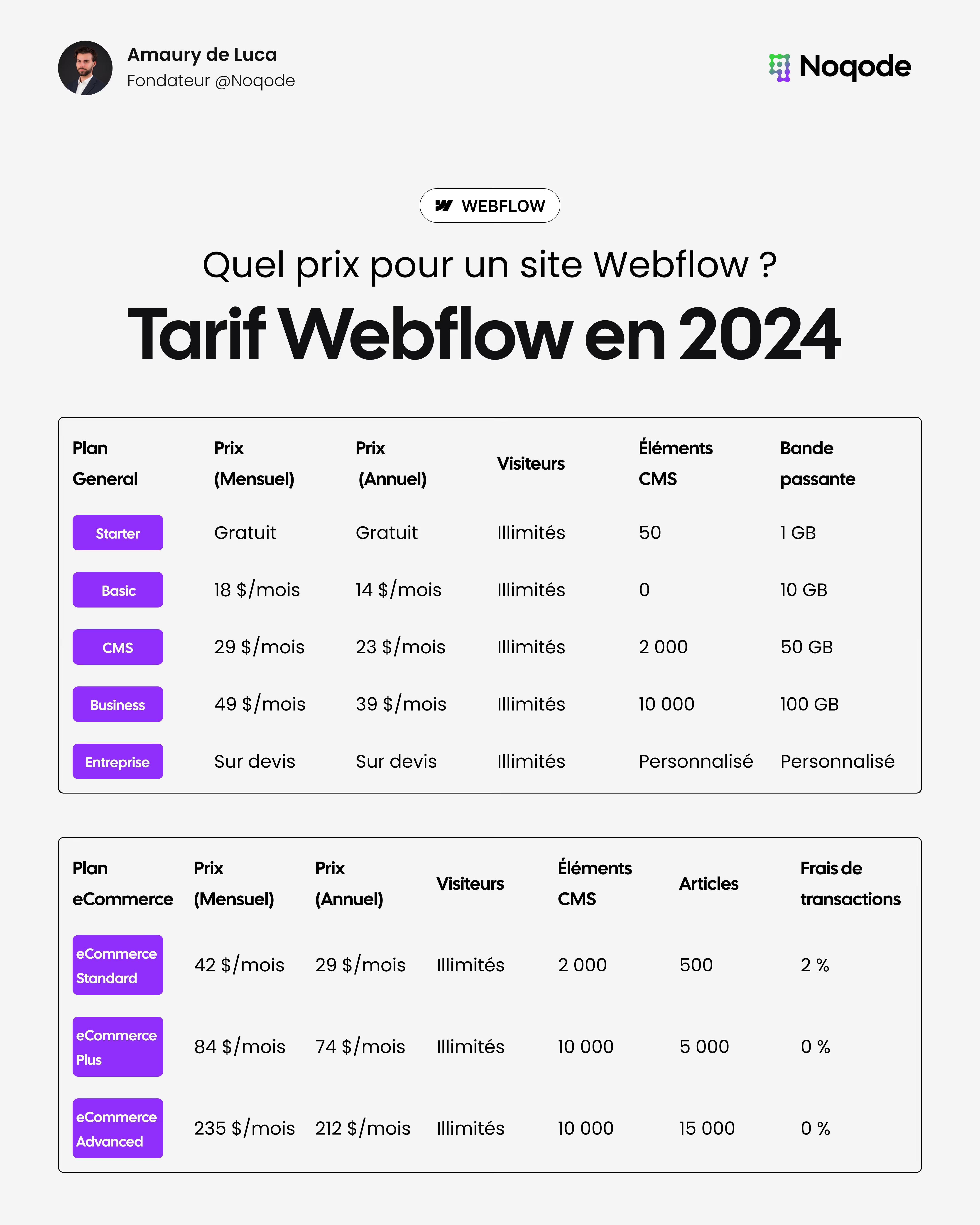
Webflow's prices are higher than those of some other platforms, especially for sites that require a lot of features. It is therefore essential to assess your needs carefully before committing.
For a detailed overview of each plan and its features, check out our comprehensive guide: Webflow rate in 2024: What is the price for a Webflow site? This guide will help you choose the best plan for an online store with Webflow.
While Webflow is designed to be accessible, it can be difficult for beginners to master. Fortunately, Webflow offers a wide range of training courses to make your marketing teams quickly autonomous in the management of their e-commerce site.
Building an e-commerce site with Webflow is an ideal solution for those who want a flexible, efficient and easy-to-manage webshop. Whether you are a startup, an SME or a large company, Webflow offers many advantages to stand out from the competition.
If you want tailor-made support to build your e-commerce site: contact us here

Yes, Webflow e-commerce is perfect for large companies looking for a customizable solution with total control over design and functionality.
Absolutely. Webflow offers an intuitive drag-and-drop interface to design e-commerce sites without coding, while giving developers options to add advanced features.
Webflow integrates payment solutions like Stripe and PayPal, guaranteeing secure transactions and a smooth ordering process.
The high cost and the learning curve are the two main disadvantages of the Standard plan. However, the advanced features and flexibility often justify the investment.
Yes. Webflow is flexible enough to handle both showcase sites and online shops. It offers comprehensive tools for both types of projects.