Claude x Webflow Connector (MCP): the complete guide to automate your site using AI

11 minutes
.
February 24, 2026
On February 9, 2026, Webflow and Anthropic officially launched their native connector. Not a Zapier integration, nor a Claude Code script to maintain. An official connector, which can be activated in two minutes from the Claude interface, which gives the AI direct read and write access to your CMS, your pages, your metadata and your variables.
At Noqode Webflow agency, we've been using it in production since day one, on our own site and on customer projects. This guide compiles what we've learned and how to activate the connector, what use cases are really time-saving, what prompts work, and where the real limits are.
The Model Context Protocol (MCP) is an open standard developed by Anthropic at the end of 2024. His role is to establish a common protocol between LLMs and external tools, so that Claude can interact with third-party services without custom code or fragile configuration.
Concretely, the Webflow MCP server exposes two families of tools to Claude:
Before the MCP, connecting an AI to Webflow required either to go through Claude Code (terminal, Node.js 22.3+, manual OAuth configuration), or to build Zapier or Make workflows, or to call the REST API directly. Valid approaches but reserved for technical profiles.
With the native connector, all that disappears. Claude acts directly on your site, on your behalf, with your Webflow permissions, from an ordinary conversation.
The procedure takes less than three minutes. Here are the exact steps:
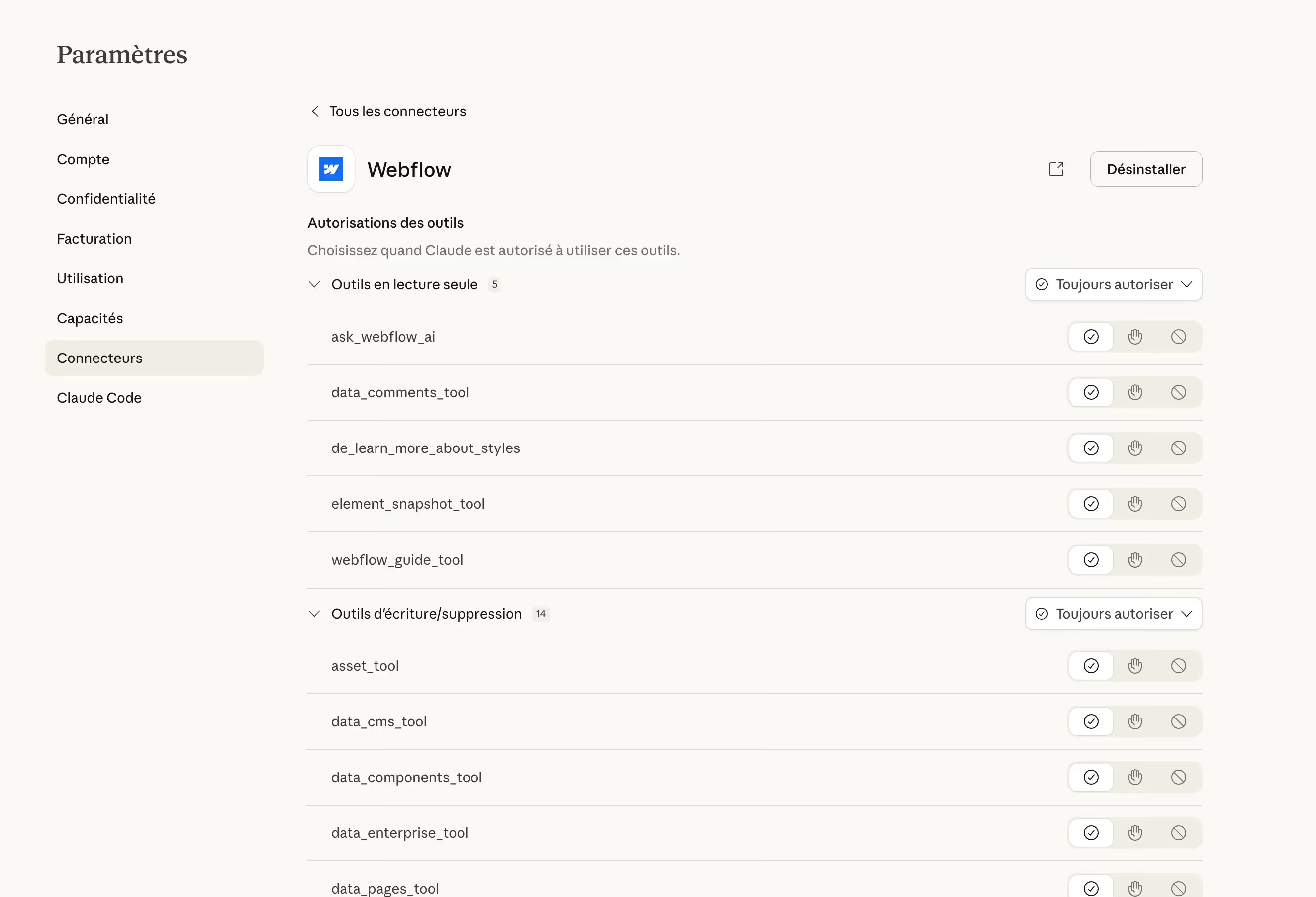
For a production site, manual mode is recommended, at least at the beginning. You keep an eye on what Claude is actually doing before it is applied.
Two prerequisites to note: one Paid Claude subscription (Pro at $20/month or Team) and, for operations involving the canvas via the Designer API, the Webflow companion application should remain open in the Designer. CMS and metadata operations via the Data API work without the open Designer.
We have a dozen Webflow comparisons on the blog: “Webflow vs WordPress”, “Webflow vs WordPress”, “Webflow vs WordPress”, “Webflow vs Bubble”, etc. Each one follows a precise structure, a hat with anchor to our page dedicated to our Webflow agency, an HTML embed table, recent figures, and contextual internal networking.
Writing a new comparison took time, not for research, but to accurately replicate the structure and tone of those that existed. With the MCP, the session takes place as follows:
Our article”Webflow vs Squarespace“was produced and integrated into the CMS in a single session. Reread, corrected on two points of detail, thumbnail added and published.
Prompt used:
“Connect via MCP Webflow to noqode.fr and look at the blog posts in the CMS. I have already written comparative articles such as “Webflow vs...” it's always the same logic. Use these templates to write a “Webflow vs Squarespace” article for inspiration.
If you need fresh or additional information, here are some useful sources:
In the article, integrate 2 to 3 blog articles or Noqode tools relevant to the subject, with natural anchors that fit perfectly into the comparison.
Also add 2 to 3 recent data, statistics, or external studies (minimum 2025—2026) to strengthen credibility and ensure that this adds value to the comparison. Check everything at least twice to avoid mistakes.”
Meta titles that are too long, generic meta descriptions copied and pasted, alt tags missing on CMS images. These are tasks that take hours by hand and that are put off because the perceived value/time spent ratio is poor.
With Claude connected, the workflow becomes:
We saved between 4 and 6 hours on the last SEO audit of our own site. On a client site with +80 pages and 200 CMS items, that's half a day of work removed.
Prompt used:
“Audit all pages on the site [URL]. For each page, check that the meta title is less than 60 characters and contains the main term visible in the slug. List problem pages in a table with: current URL/current meta title/problem identified/proposal corrected. Do not change anything for now, wait for my validation.”
Our local page strategy covers Paris, Lyon, Marseille, Monaco, Lille, Toulouse. Each page follows the same pillar architecture, but must be sufficiently differentiated to avoid duplicate content and provide real local value.
Without MCP, the workflow was to copy the pillar page, adapt manually section by section, create the CMS item, configure the metadata. Between 30 minutes to 1 hour per city.
With Claude:
What used to take 30 minutes to 1 hour per page now takes 5 minutes. We validate, we adjust a line or two and we publish!
On an ongoing customer project, a consulting firm migrating from WordPress to Webflow, the MCP accelerated the migration phase. The source site had over 30 consultant pages, each with SEO redirects to configure, tags to reformat, and WordPress shortcode to clean up.
Claude read the source pages (provided via HTML copy), reformatted them into clean HTML compatible with Webflow, integrated them into the target CMS with the right metadata and generated a list of 301 redirects for Webflow. Time-consuming tasks with no added value that have disappeared from the technical scope of the project.
On sites that have several contributors or that are more than a year old, CSS classes are quickly becoming a work in progress. Unnecessary variants are piling up, values are hard-coded where CSS variables already exist, and namings diverge.
Claude can audit all the classes and variables of a site via the MCP, identify duplicates, naming inconsistencies, and values to be converted into variables. It lists the problems, suggests corrections, and applies them upon validation.
Prompt used:
“Audit the CSS classes and variables of the [site ID] site. Identifies: 1) similar classes that could be consolidated, 2) hard-coded color or size values that correspond to existing variables, 3) naming inconsistencies with respect to a BEM system or a defined convention. Generate a structured report before doing anything.”
You have to be honest about what the MCP is not doing, and not yet doing. 😉
Our positioning on AI applied to Webflow is not a marketing angle. It's a real operational advantage. What we recommend to customers is first done on our own site. The argument is not theoretical and this is what allowed us to publish a comparison in 30 minutes instead of 2 hours, to audit our SEO metadata in one session, and to start 6 local pages without mobilizing a developer.
The window of competitive advantage on this type of tool is short. In 12 months everyone will be using it. Today, the agencies that really master it in production can be counted on the fingers of one hand. At Noqode, we are building this mastery now, for our projects and for those of our customers.
If you want to see how MCP Webflow is integrated into a project from A to Z, contact us. 30 minutes to analyze your context and show you what is actionable from next week.
Claude Code is a command line tool that requires Node.js 22.3+, manual OAuth configuration, and installation via npm. It is suitable for developers who want advanced automations or scripting. The native connector is activated from the Claude web interface in two clicks, without a terminal, without technical configuration. For CMS and SEO use cases, the native connector is clearly the best option for 95% of teams.
Only for operations that affect the canvas via the Designer API (creating visual elements, modifying styles, managing components). Operations via the Data API (CMS, pages, pages, metadata, custom code) work without the Designer open. In practice, the majority of editorial and SEO use cases do not require the Designer.
Yes. Claude can read content from a primary locale and push translated content into a secondary locale. In particular, it is used to translate HTML embed tables in our English version. This is one of the most powerful use cases for multilingual sites, especially for agencies that manage international sites.
Both are possible according to the instruction provided. In manual approval mode (recommended), Claude lists the actions he will perform and waits for your validation before applying them. In automatic mode, it acts directly. It is always recommended to go through a draft and to reread before publication, regardless of the configuration chosen.
No MCP connectors require a paid Claude, Pro ($20/month) or Team subscription. On the Webflow side, all plans give access to the APIs that power the connector, including the Starter plan.
Authentication is done via OAuth on your Webflow account. You choose exactly which sites are accessible during setup. For client projects, the best practice is to have editorial or admin access to the client workspace and to configure permissions at the level of the site concerned only.